This is so much easier than pressing hard on the bottom side of the touchpad why did no one tell me this was a thing 😭😭
Wait until I blow your mind and tell you about 3 finger drag.
wait until you find out what happens when you drag your sack across it.
Framework laptops do this. Double finger tap is right click, triple finger tap is middle mouse button
Most laptops do this IIRC (don’t use them much lol) Asus and Dell too at least, I’m pretty sure.
Wait until you realize you can smooth scroll with 2 fingers.
The amount of laptop users I see using a mouse to scroll webpages is exhausting. And I don’t mean the mouse wheel, I mean clicking and holding the down arrow in the browser.
I have colleagues that keep dragging the little block in the sidebar.
That is significantly easier, more accurate, and somehow faster than the arrow.
Believe it or not, those scrollbars used to be way bigger, not autohide, and look solid and three dimensional. I miss those days.
I hate that they auto hide. I have turned that feature off in the past.
Truly a terrible design philosophy that has been forced on everybody
Hey, sometimes the scroll bar is better. Like when you’re looking at a mile-long document and looking for the one part you care about
Ctrl/cmd + f
Wait until you hear about the key “Next Page”
edit : it is indeed PageDown
My American keyboard has a “page down” key? It’s still slower than the scroll bar sometimes. Seriously, sometimes I scroll through a multi-MiB text file.
But the bigger the text file, the more aggressive tiny scroll bar moves become. I can’t see anything if I try to use that method in a document too large. It scrolls too fast.
Options are good.
tbf, Microsoft keeps fucking with my mouse drivers so the scroll wheel is erratic
In this case “T” means “twenty-years-ago” for me :D
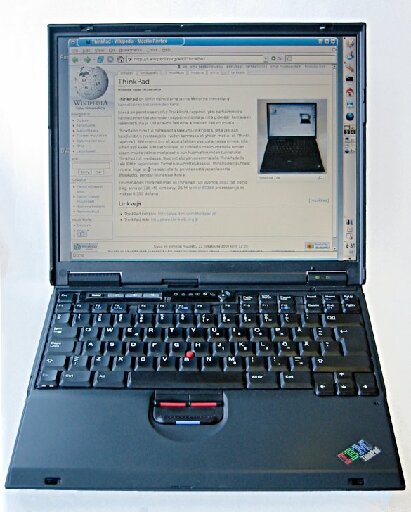
Thinkpad nipple gang RISE UP!
It’s called “the clit”.
Oh man, my first laptop,
300 ish MHz thinkpad 600600 ish MHz thinkpad t20(ish). Man I loved that thing. Bought it with no hard drive, didn’t know about bootleg windows, so I learned Linux. DSL, in fact. Those were the days.Edit:
I’ve been trying to remember what exactly it was, I noticed the 600 has the drive on the front but mine was definitely on the side.
Best I can tell, I think it was a T20, not a 600. They look very similar.
Even the “buttonless” trackpad is better, than just fingertapping (I used to have so many misclicks).
It’s been on Apple products for a solid 20 years. On the PC side it totally depends on the hardware and drivers to support multi-touch
Every laptop I ever used had this, I’m still bewildered that people don’t know. I actually like touchpads because they give you a bunch of gestures a mouse just can’t
If the ergonomics weren’t complete dog shit I’d still be using the magic mouse to get the best of both worlds.
There are some gestures you can perform on a touchpad, but not on a mouse, but KDE on Linux supports mouse gestures as well. I don’t think Windows, or even Mac, does though.
Mac had gestures for both trackpad and their “magic” mouse. I’ve never bought an Apple product for myself, but I have repaired and worked on many in the past and I’ll say their trackpad has been great for years. That said the top of it used to be a glass, so when you’d do repairs they actual install instructions would have you tear a sticky note/paper and put them between all the edges to set it in the center then pull them out to ensure it was centered and wouldn’t crack by hitting the edge.
Such as?
- two finger swipe
- three finger swipe
Pinch zoom is still handy and less so, but occasionally twisting gestures as well.
I still use the fan out gesture to see the desktop after taking screen grabs out of habit too.
Please tell me more about twisting gestures.
Scroll wheel and alt tab?
Your mouse has alt and tab keys?
I wish either my mouse or my numpad had a Tab key. I use a trackball, so I tend not to move my whole arm around the desk, I’ve gotten to where I’ll strike my numpad enter key without lifting my hand off the mouse.
For a lot of things, I wish there was a Tab key on that side of the keyboard.
Yeah, two finger scrolling seems quite universal. Three fingers switch between virtual desktops on my system (Gnome).
It can also trigger overview if done upwards
On kde you need 4 fingers for that instead of 3 for some reason
I’ve that on super/window key, probably faster if you have the key and a flexible thumb.
Pinch to zoom on images and browsers, swiping left and right to go forward or back in a browser, switching virtual desktops
Ctrl+scroll wheel to zoom. Mine had additional buttons for back and forward, some have scroll wheels that can be clicked left and right. Virtual desktop I don’t use so dunno, but I think there’s a quick keyboard shortcut.
Yep, the mouse needs the keyboard for most of those.
You have your hand there pretty much by default. If you’re doing anything you’re using it for shortcuts anyway.
I’m not sure why you’re being down voted. My left hand basically never leaves the home keys in a keyboard / mouse setup and I use various left hand + mouse combos to achieve all these things.
I fucking hate touchpads and if I do use a laptop undocked I’ll generally disable the touchpad when the mouse is plugged in.
They’re useful tricks if there’s no mouse available of course. To each their own I suppose.
On macOS you can do all kinds of crazy shit with gestures. Using a mouse feels very obsolete and slows everything way down.
Such as?
Yeah swipping between screens or forward backward in the browser up and down the browser page, used to be 4 fingers up to mission control and I can’t remember all of them. It really did make movement pretty fluid. Now they do a thing that I believe is only integrated to Apple apps where if you are signed into your Apple account you can continue between devices fairly simply. Like if you have an email/texg open on the iPhone and walk up to your Mac an icon appears on the dock far right with a phone symbol, you tap it and it opens the mail/messages/safari app to where you were and wrap what you were doing. I believe it does the opposite as well by opening the phone, going to app switcher and the active app on the Mac will be an option to continue on the iPhone
Basically anything…they work similar to keyboard shortcuts.
I remember having a four finger click(not tap, that’s a different gesture) to lock my machine when I was using a MacBook at work.
Show/hide desktop, open window manager, open app drawer, scroll in all 4 directions, zoom in and out, you can press and then press harder for more functions sometimes
Most of those I do with a keyboard trivially. Personally, I don’t see the benefit. Keyboard shortcuts are superior 99% of the time, and KDE supports mouse gestures as well (though I don’t use them), so you don’t even need a track pad for most of them.
Pinch, three (or four, although I don’t really like them) finger swipes, less awkward edge-gestures (the alternative to which is the “move mouse against display edge”), to name a few
Switch desktops? I can’t think of many that a mouse can’t do that I actually use.
Touchpad allows scrolling to the side and zooming without pressing ctrl a single hand
First, two fingers to right click has been on literally every Windows or Linux touchpad enabled device I’ve ever encountered.
Second, three finger for middle click is also a regular thing that has existed on every Windows and Linux device I’ve ever encountered, but to this day takes a third party app to work on macos.
Please don’t act like the company actively hostile to power users is the one doing you favors.
the company actively hostile to power users

He’s out of line, but he’s got a point
T.T
Love the reference.
two fingers to right click has been on literally every Windows or Linux touchpad enabled device I’ve ever encountered.
Sounds like you haven’t been playing with computers very long cause it took almost a decade for Linux and Windows to add that. It wasn’t added till Windows 10, and Linux added synaptics drivers maybe a year before M$.
Like yeah synaptics had drivers or in 2007 ish but it wasn’t on every machine
My Lenovo did all this in 2003.
It’s mostly driven by the brand of touchpad and their drivers, not windows.
Lol you’re just wrong. Typical Apple fanboy
Ah but those Mac trackpads feel so nice. Still wouldn’t choose one over my ThinkPad but I’ve never used one I liked better than that on a Mac.
Unix with a solid GUI on top
Automation built into the GUI, with a dedicated language or accessible via the API.
Thousands of third-party utils to tweak the UI, including tons of open-source ones because programmers love Mac for the Unix. Including stuff like Hammerspoon and Alfred, the likes of which Linux users have never seen.
“the company actively hostile to power users”
Apple haters are like a broken record.
Not sure what you’re getting at - it looks like you’re quoting something?
I use mac every day for work, and I do like that it is based on Unix, but the desktop/GUI is a nightmare, and the fact you have to use “thousands of third-party utils to tweak the UI” or use hammerspoon or Alfred instead of having options to do regular shit is a downside, and in corporate settings sometimes people aren’t even able to install 3rd party utils, which case they’re just SoL
the fact you have to use “thousands of third-party utils to tweak the UI”
What, like when you have to have a program or a widget in Linux or Windows to do some UI stuff? Which program might not be there out of the box? Idk why it’s such a difficult concept for Mac haters that when you have an app doing some UI tweaks, it’s the same thing in every OS. Mac UI is just conservative by itself, the same way as some Linux GUIs are barebones — which is somehow paraded as great success by Linuxoids but is looked down upon when Mac is doing it.
or use hammerspoon or Alfred instead of having options
You don’t “have” to use Hammerspoon or Alfred, but you can use them to do advanced stuff. Which you can’t do in Windows or Linux, because there’s nothing quite like these apps there. Alfred has some feeble analogues, while there’s bupkis like Hammerspoon aside from Autohotkey for Windows with its shitty 80s-style language and limited abilities. The fact that there isn’t a Hammerspoon-like app for Linux is a travesty, considering Linux users go on all day long about how it’s customizable and caters to power users. And by the way, if you look at Hammerspoon and Alfred and don’t know why you might want to use them, you’re not a power user.
Man, you are really focused on me being a “mac hater”, despite me indicating I use one every day and am complaining about real issues that I grapple with.
And constructing a strawman about windows/Linux needing 3rd party apps as well is just silly. I did require some way back in windows 7 for some multi desktop stuff, and I’m sure some people with very specific workflows might still want them, but built-in settings get you really far and are good enough for me these days. On windows I have to get WSL or historically mingw or something, but that’s really outside the UI realm and I don’t even use Windows these days anyway.
a strawman about windows/Linux needing 3rd party apps as well is just silly
You’re right here. Windows now needs third-party apps to remove “features”, not to add them. That’s the biggest difference between Windows and Mac these years. As for Linux, it always was and remains a toss-up as to whether the widget you want is installed, so I don’t see the fucking distinction. It’s not like Linux has every widget under the sun installed by default, is it? That would be pure madness.
Again, I invite you to look into Hammerspoon and Alfred for what UI interaction could be like, if you have even the slightest scripting chops. For example, my Android phone could hand off the Bluetooth headphones via the Automate app to the Macbook or vice versa, via drop-down widgets on the phone or a custom command on the laptop. With Linux, I have to kludge up my own endpoints with an Nginx webserver, no less, with barely any desktop APIs available through the command-line.
With KDE connect and probably the GNOME equivalent I can do whatever I want to my computer from my phone.
Again, though, this discussion started talking about things I want settings for that have settings in other OS. I’m sure you can do really cool things with it, but I don’t want to learn a scripting API to be able to do these things on my work computer.
I think the two finger right button tap has been there on all PC laptops I’ve used since the early 00s, even the lower mid range ones. Most of them have supported two finger scrolling anywhere on the trackpad but a few only did one finger along the edges like the 90s, along with customizable corners and zones and whatnot. Gestures and three finger tap for middle button or other functionality though was random until mid 2010s when it too was widely supported. That is, if we are speaking brand laptops and not junk OEMs or low end garbage.
Um, that’s in the settings. Does nobody else obsessively adjust every setting when they get a new device? Just me?
I usually read the full manual too
I even what adjust settings I don’t understand m sometimes I learn what it does. Sometimes I don’t. I don’t always liked making what it does
This is the only way on chromebooks
And three fingers tapping is often a middle-click or wheel-click, which is often a shortcut for ‘open in new tab’ while browsing the web. On some linux systems it is also a shortcut for paste if in a text input field.
Middle click isn’t a shortcut for paste in Linux, it’s what Unix had before cut-copy-paste was invented.
Highlighted text will be stored in what’s called the Primary Buffer. This is separate from the “clipboard.” Middle clicking in a text entry field will insert the highlighted text. No action needs to be copied. Watch, on a linux system:
Open a GUI text editor. kwrite, gedit, libreoffice, whatever.
Highlight and Ctrl+C this text: This text was stored in the clipboard.
Simply highlight this text: This text was stored in the primary buffer.
click in your text editor and middle click. Then hit enter for a new line, then hit Ctrl+V. Neat, huh?
That’s how you right click on a Macbook.
“secondary click” i have found unassigned in many a Mac. Like either they have been upgrading and using migration assistant to new machines, or it wasn’t a default when they got the machine somehow. Telling someone to two finger tap vs double tap sometimes gets confusing as well so I write it as ctrl click for Mac users
Could be others too, depends on the touchpad drivers
Yeah the “guess where the clickable zone is” trend from smartphones turns out to actually not be that good. Multi-touch is a billion times better. There’s a reason it’s the default on Macs.
At least on smartphones there’s some actual indications where it expects the zone to be. The touchpads with zero markings or boundaries to feel where the zones intended to be ‘middle click’ or ‘right click’ is just an absolute rough guess…
Mac trackpads are sooo fucking nice. I’ve used some very premium windows laptops, but nothing compares to how well Apple does it. Hate to shill, but it’s completely honest
Even the most diehard Apple haters I’ve encountered will readily admit that Mac trackpads are the shit. It’s not even an opinion it’s just a fact
I’m glad you know it now because its so helpful! These have been around 17 or so years I believe.
Pretty sure my Lenovo had this in 2003, lol.
It depends on the laptop and which touchpad they use.
Thinkpads got it right with the physical mouse buttons above the touchpad.
Bring back the nipple! (xkcd 243)
It left? Mine’s got one and it’s fairly recent.
You’re growing nipples?
No, I’m rubbing them😏.
My 2023 Thinkpad has one
I got a ThinkPad this year with one
Got mine last year I think… A p16s gen3 for reference.
My brand new 2026 Lenovo also has one!
I always preferred below since you could then use the thumb to click. Buttons built into the touch surface are worse than not having them at all, however.
You can also three-finger tap the touchpad to perform a middle click.
Not on Mac without a third party application! Just like using a regular fucking mouse normally or using a regular external monitor without it being blurry as fuck!
Just like using a regular fucking mouse normally
Nice, pulling bullshit out of your ass now because you must hate Apple at all times even for invented reasons, otherwise life isn’t worth living.
Scroll wheels? What year is this?
Get yourself a Magic Mouse and don’t look back.
I have ergonomics issues and prefer to use the mouse that doesn’t cause me pain.
Yeah, just as I wrote in another comment, you have the conservative default Mac UI, and you have a plethora of open-source third-party tweaks for it, same as with some Linux GUIs. Mac’s UI is solid and has excellent usability because it doesn’t expose hundreds of options to tweak every possible behavior. I derived no pleasure from wading through Windows’ control panel for hours in search of one or another option that I needed, and to my knowledge KDE’s approach is the same but on meth.
I don’t like Windows either to be clear, and having the settings spread out in different areas is annoying at best, though its defaults are less infuriating and I can get a mostly annoyance-free system with just built-in settings and powertoys.
KDE is great because all I have to do is go through the regular-ass settings app and tweak what I want to get an easily usable system. The fact you think having settings is a bad thing and having to install random software to do common things is insane, but to each their own I suppose.
Settings are good when one doesn’t have to spend ten minutes getting RSI to find what they want. The control panel is now my litmus test for the quality of the UI. The first time I tried MacOS in a VM, I saw clear as day that it was made for humans instead of whatever random design philosophy MS uses. Same with Gnome 2, which was lifting a lot of ideas from MacOS.
Alas, Cinnamon has plenty of jank elsewhere, so I might have to try KDE again.
Ooh, kinky.